
Meal photos and voice input
Take a photo or describe the meal. Review and edit the detected foods, portions and details before confirming.
Calorie counter and food diary app for Android
Log meals in nine ways, review calories and macronutrients, correct automatic estimates and track hydration, activity, weight, symptoms and sleep. You can also organise your pantry and shopping list, consult a plan and share only the data you authorise.
Available on Google Play through open testing for Android. Official NUTRIMI listing: com.biteapp.nutrition.

How logging works
A restaurant meal, a packaged product and a repeated breakfast do not need the same workflow. Photo, voice, barcode and search remain available from the same action.

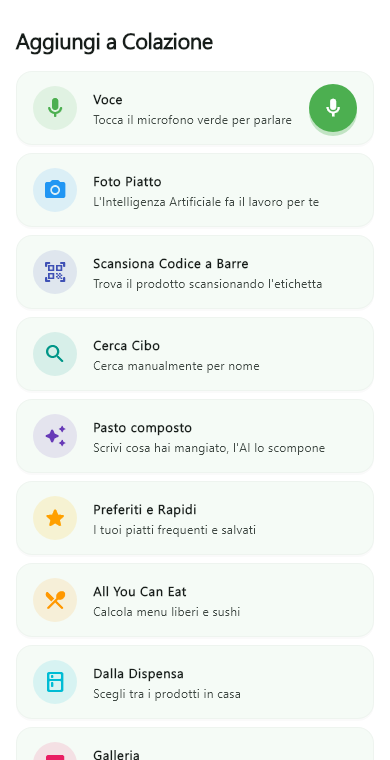
Take a photo or describe the meal. Review and edit the detected foods, portions and details before confirming.
Scan a packaged product or reuse foods already saved. Repeated meals take fewer steps.
Keep allergies and dietary restrictions available in the language needed when ordering.
Review meals, weight, hydration and symptoms before an appointment instead of reconstructing the week from memory.
When a practitioner publishes a plan, import it as a daily reference while keeping alternatives and notes accessible.
Review informational references and implemented calculations for pregnancy, breastfeeding and supported clinical conditions, with declared limits and published sources.
Get informational support in chat. Report any conversation. A person can review what happened.
Premium + Visit includes nutritionist-led appointments. Your diary supports professional follow-up.
Professional connection
First check the professional’s identity. Then choose the categories to share: diary, weight, hydration, symptoms and other available data.
Check the professional’s name and profile.
Select each category separately.
Choose whether to add the published version.
Edit permissions or end the connection.
NUTRIMI shows foods, portions, calories and macronutrients. Edit each item. Then save the meal.
Frequently asked questions
It is software that helps record foods, quantities and nutrition information over time. NUTRIMI combines a food diary, calorie counter, macro tracking, multiple logging methods and, when authorised, a connection with a professional.
An effective app displays the plan and simplifies logging. NUTRIMI imports the plan published by your nutrition professional. It records meals, progress and authorised categories.
Yes. It calculates calories and macronutrients for meals entered by photo, voice, barcode, search and other methods. Every automatic result is an editable estimate: review it before saving.
The target uses declared formulas. It considers profile data and activity. Read the formulas, steps and sources.
Yes. Personal app features can be used without a professional connection. The professional portal adds a shared planning and follow-up workflow.
Yes. NUTRIMI shows every food separately. Edit portions and details before saving.
No. A professional sees only the categories you authorise and only while the connection remains active.
The plan includes nutritionist-led appointments. Your shared diary supports professional follow-up.
Yes. The software includes calculations and references for pregnancy, breastfeeding and supported conditions. An individual target, especially with a condition, pregnancy, breastfeeding or therapy, requires assessment by a healthcare professional. Review the maternal requirements method and the declared clinical compatibility.
Yes. The AI-assistant chat is supervised and can be reported to request a review. Premium + Visit provides nutritionist-led appointments and professional follow-up.